
Online Session Planner

We are pleased to announce that the conference program is now available in our web application, iPLANNER.
Please note that the program remains subject to change and may be updated accordingly.
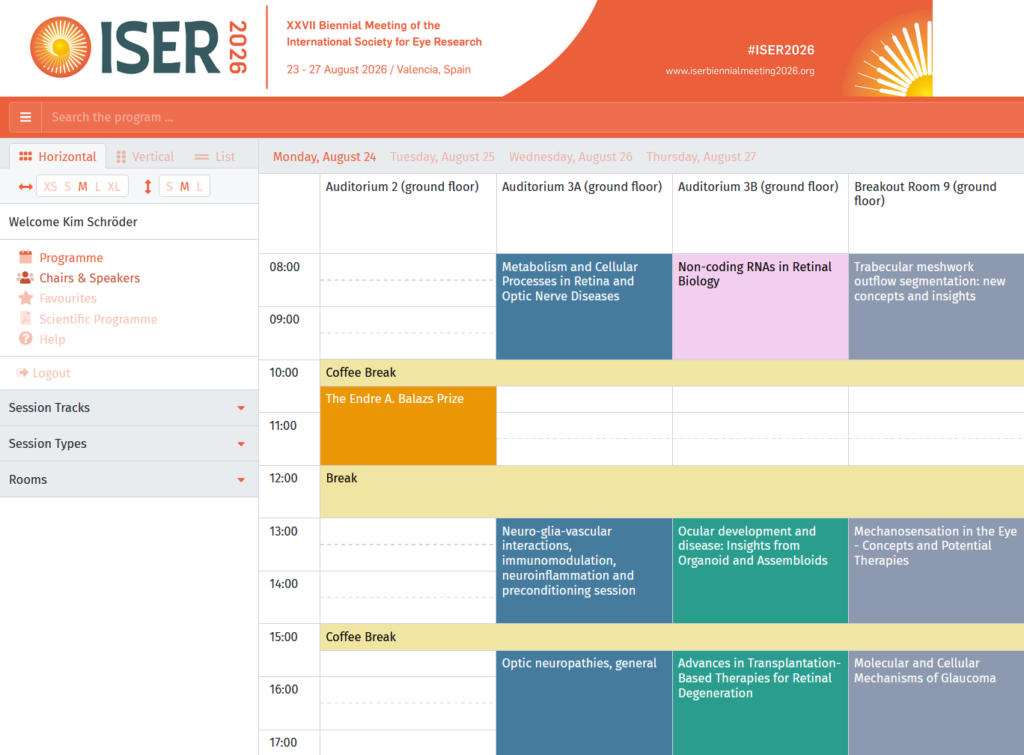
Day-to-day iPlanner instructions

Display Format

Choose how to view the program, in a graphical grid format or in a list format.

Click on the horizontal or vertical icon to show sessions in a graphical grid view;
Click on the list icon to show sessions in a list view.

Click on a session to preview the content. When previewing a session, click on the star icon to add the session to your favourites.


Favourites and Login

You have to login to be able to save your favourites in the cloud. This login allows you to use the favourites on other computers and browsers as well.

Your name is shown at the top of the left side menu while you are logged in. You may already have a login from a previous conference (online program or abstract submission system).


Search the Program

Enter a search term into the search field in the top left area of the page. You can search for session and presentation titles, codes, abstract numbers, names and institutions. The search will show:

In the grid view: sessions with no matches are greyed out (but can still be opened), sessions with matches are shown in the colour of their session types;
In the list view: only sessions with search matches are listed;
The person icon indicates that a session or presentation contains a person that matches your search term. Click on this icon to open a preview.

Click the icon above the search phrase box to remove the search filter.


Filters

Show selected content of the scientific program by applying filters.
You may choose selected days, session types, session tracks or session rooms as filters. Click the icon above the respective filter to remove it.